How to Automate WhatsApp Lead Follow-Ups in India: A Complete Guide for Small Businesses
Learn how WhatsApp lead automation helps Indian businesses capture leads, automate follow-ups, connect CRM systems, and improve sales productivity.
Imagine running a small business and receiving enquiries from multiple sources every day. Some customers contact you through your website, others send messages on WhatsApp, and many arrive through Facebook and Instagram advertisements.
Your sales team must respond to every enquiry, understand the customer's requirements, share product information, schedule follow-ups, and maintain records. When these tasks are handled manually, important leads can be missed, responses may be delayed, and sales representatives can spend hours on repetitive activities.
This is where WhatsApp lead automation can help.
WhatsApp lead automation allows businesses to organize incoming enquiries, send appropriate automated responses, manage follow-up reminders, and connect customer conversations with a CRM system. Instead of relying entirely on manual processes, businesses can create a structured workflow that helps their sales teams manage leads more consistently.
For Indian small businesses, including service providers, educational institutes, real estate agencies, consultants, and online sellers, WhatsApp can be an important customer communication channel.
In this guide, we will explain how WhatsApp lead automation works, how to connect it with your CRM, which workflows businesses can implement, what to consider when budgeting, and how to get started.
What Is WhatsApp Lead Automation?
WhatsApp lead automation is the process of using approved tools, integrations, and predefined workflows to manage customer enquiries and sales follow-ups through WhatsApp.
A typical system can capture a lead from a website form or advertisement, store the customer's information in a CRM, acknowledge the enquiry, notify the relevant salesperson, and schedule the next follow-up.
Depending on the platform and configuration, businesses may also automate frequently asked questions, appointment reminders, lead qualification, and customer support routing.
For example, suppose a person submits a form requesting information about your services. Instead of waiting for a sales representative to notice the enquiry, an automated workflow can record the lead, send an appropriate acknowledgement through an authorized WhatsApp integration, and assign the enquiry to a sales representative.
The salesperson can then review the conversation and continue the discussion.
The goal is not to replace every human interaction. It is to reduce repetitive work and help your team respond to genuine customer interest more efficiently.
WhatsApp Business App vs WhatsApp Business Platform
Businesses should understand the difference between the WhatsApp Business app and the WhatsApp Business Platform, commonly accessed through the WhatsApp Business API.
The WhatsApp Business app offers useful features for smaller operations, including business profiles, quick replies, labels, and basic messaging tools.
The WhatsApp Business Platform supports more advanced integrations and automated messaging workflows. Depending on the implementation, it can connect WhatsApp conversations with CRM software, websites, support systems, and other business applications.
Businesses that need shared team access, automated lead assignment, large-scale workflows, or centralized reporting should evaluate whether the Platform and an appropriate integration solution are necessary.
The right choice depends on your enquiry volume, team size, automation requirements, and budget.
Why Indian Small Businesses Need WhatsApp Lead Automation
Many businesses receive leads through several channels but manage them using separate tools. A salesperson might check WhatsApp messages, another employee might maintain an Excel spreadsheet, and a manager might review enquiries in an advertising dashboard.
This fragmented process makes it difficult to maintain a complete view of the sales pipeline.
WhatsApp lead automation can address several common problems.
1. Delayed responses to enquiries
Customers often contact multiple businesses before making a decision. A delayed response can make it harder to keep their attention.
An automated acknowledgement can confirm that an enquiry has been received and explain when the customer can expect a response.
2. Missed follow-ups
Sales representatives handle meetings, calls, proposals, and existing customers. Without a reliable reminder system, follow-ups can be forgotten.
CRM-integrated automation can create tasks and reminders based on lead status, enquiry date, or other defined conditions.
3. Disorganized lead information
Customer details scattered across spreadsheets, email inboxes, and messaging applications make tracking difficult.
A connected CRM can store relevant contact details, lead sources, conversation history, assigned employees, and sales stages in one place.
4. Repetitive sales tasks
Sales teams often send similar introductory messages, answer recurring questions, and share the same brochures or service details.
Approved templates, saved responses, and automated workflows can reduce repetitive work while allowing representatives to personalize conversations when necessary.
5. Limited visibility into sales performance
Without reliable records, managers may struggle to identify which advertising campaigns generate qualified leads or where enquiries become inactive.
A CRM dashboard can help teams track enquiry sources, follow-up completion, lead status, and conversions when the required data is captured correctly.
How WhatsApp Lead Automation Works
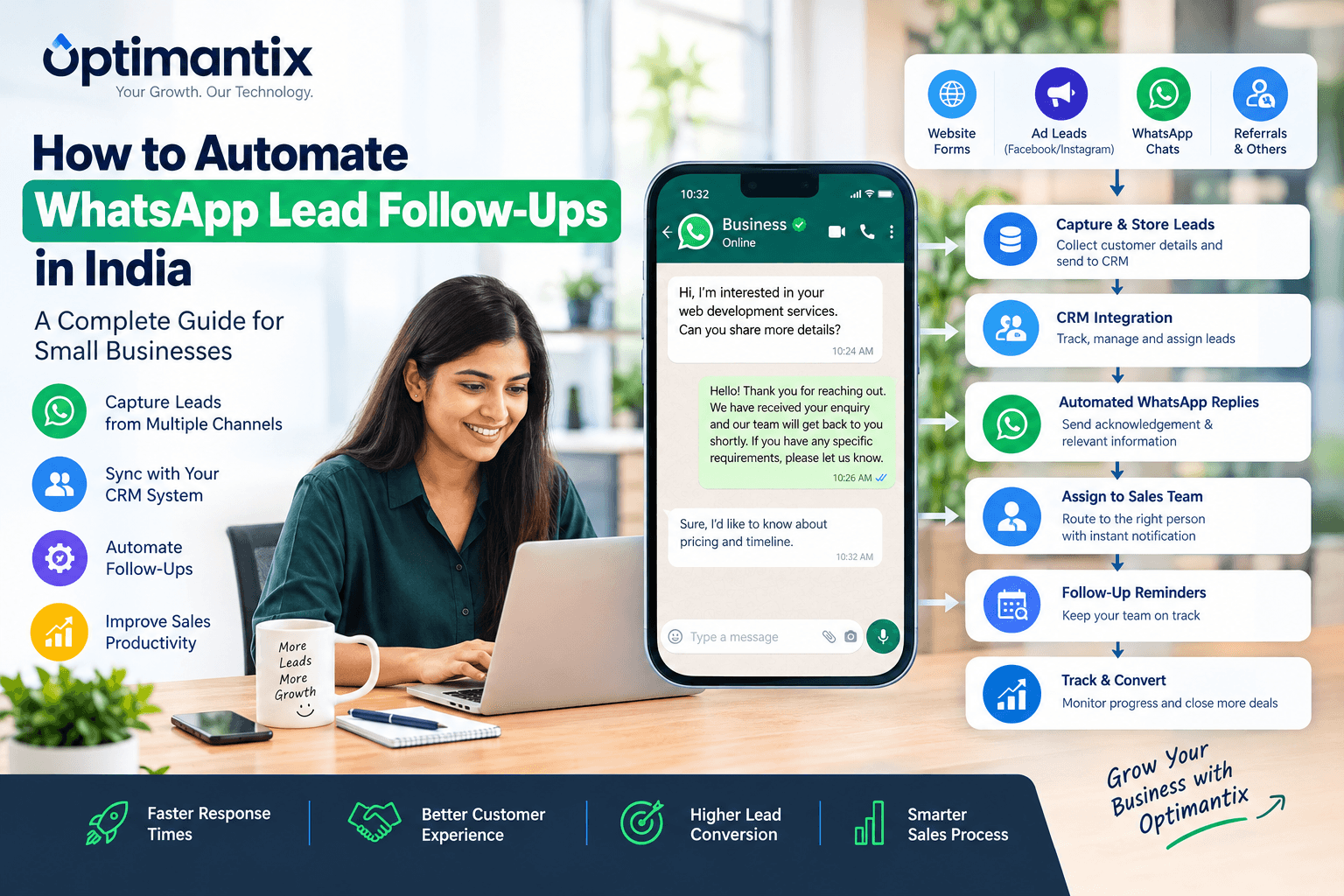
A typical WhatsApp lead automation system connects the channels where customers discover your business with the tools your sales team uses to manage enquiries.
The workflow can be divided into six steps.
Step 1: Capture leads from different sources
A potential customer may contact your business through:
Website enquiry forms
Click-to-WhatsApp advertisements
Facebook or Instagram lead forms
Landing pages
Product enquiry forms
Referral campaigns
Other authorized lead-generation channels
Your system should record the information necessary to respond to the enquiry, such as the customer's name, phone number, service interest, and lead source.
Only collect information that is appropriate for your business purpose and handle it according to applicable privacy requirements.
Step 2: Send the lead information to your CRM
An integration transfers the lead details into a CRM system or another designated lead-management database.
The system can check whether the contact already exists, update relevant fields, and create a new lead when appropriate.
For example, a digital marketing agency could store the following information:
CRM field | Example |
|---|---|
Lead name | Rahul Sharma |
Lead source | Website form |
Service interest | SEO services |
Lead status | New enquiry |
Assigned employee | Sales representative |
Next action | Initial consultation |
These are illustrative records, not actual customer data.
Step 3: Send an appropriate WhatsApp acknowledgement
After a lead is captured, the system can send an acknowledgement through an authorized WhatsApp integration when the required permissions and messaging conditions are satisfied.
For example:
“Hello Rahul, thank you for enquiring about our SEO services. We have received your request, and our team will review your requirements. If you would like to share any additional details, please reply to this message.”
The message should be relevant to the enquiry and should not promise a response time that your business cannot meet.
Step 4: Assign the lead to the right person
Lead assignment can follow predefined rules.
For example:
Website development enquiries go to the development sales team.
Digital marketing enquiries go to the marketing team.
Leads from a particular region go to the relevant representative.
High-priority enquiries are flagged for prompt review.
The system can notify the assigned representative and create a follow-up task.
Step 5: Schedule follow-ups
If a customer has requested more information but has not yet responded, your CRM can remind the salesperson to review the enquiry.
Where permitted, an automated workflow can also send an appropriate follow-up message using the required WhatsApp messaging format.
Follow-ups should reflect the customer's previous interaction and stated preferences. Repeatedly sending generic messages can damage trust and increase the likelihood of blocks or complaints.
Step 6: Track the lead until conversion
The sales team updates the CRM as the customer progresses through the pipeline.
Common stages include:
New Enquiry → Contacted → Qualified → Proposal Sent → Negotiation → Won or Lost
The system can use these stages to trigger internal reminders, prepare reports, and help managers identify leads that need attention.
Practical WhatsApp Lead Automation Workflows
The most useful workflows are those that address a specific problem in your existing sales process.
Workflow 1: Website enquiries to WhatsApp and CRM
Best for: Service businesses, consultants, software companies, and agencies.
A visitor completes a form on your website requesting a quotation.
The automation workflow:
Captures the enquiry and contact information.
Creates or updates the lead in the CRM.
Records the requested service and lead source.
Sends an acknowledgement through an authorized WhatsApp integration if the customer has provided the necessary consent.
Assigns the lead to a sales representative.
Creates a follow-up task.
Updates the lead status as the sales process progresses.
Example: A website development company receives an enquiry for an e-commerce website. The CRM records the project type, budget range if voluntarily provided, and requested timeline. The assigned salesperson can review the details before contacting the prospect.
This approach helps keep the enquiry organized from the beginning.
Workflow 2: Facebook and Instagram advertising leads
Best for: Businesses running lead-generation campaigns.
Advertising campaigns can produce enquiries throughout the day, including outside normal business hours.
A connected workflow can transfer eligible lead information into the CRM, record the campaign source, assign the enquiry, and initiate an appropriate response when messaging permissions allow.
For example, a coaching institute running an advertising campaign for an online course could record the course of interest and assign the enquiry to its admissions team.
The team can then answer questions about eligibility, course schedules, and fees.
To evaluate performance, track which campaigns generate qualified enquiries and actual enrolments, rather than relying only on the total number of leads.
Workflow 3: Automated sales follow-up reminders
Best for: B2B sales teams, real estate businesses, and high-consideration purchases.
Some customers need additional time before making a decision. A salesperson may send a quotation and then forget to follow up.
A CRM workflow can create reminders based on the quotation date or the next action agreed with the customer.
An example schedule could be:
Day 0: Share the requested quotation.
Day 2: Review the enquiry and follow up if appropriate.
Day 5: Check whether the customer needs clarification.
Day 10: Update the opportunity based on the customer's response.
This is an example of an internal task schedule, not a recommendation to send a WhatsApp message automatically on every listed day. Any customer-facing messages must be appropriate, permitted, and consistent with the customer's preferences.
If the customer declines further communication, the workflow should stop.
Workflow 4: Lead qualification and routing
Best for: Businesses receiving enquiries for multiple products or services.
A lead qualification workflow collects or uses information relevant to the customer's requirements.
For example, a cloud services provider may need to understand whether a prospect is interested in cloud hosting, dedicated servers, backup services, or managed infrastructure.
The workflow can categorize the enquiry, record the relevant service, and assign it to the appropriate team.
Simple routing rules may use the service selected on a website form. More advanced systems can use chatbot questions or AI-assisted classification, with human review where necessary.
Avoid collecting sensitive information unless it is genuinely required and appropriately protected.
Workflow 5: Appointment booking and reminders
Best for: Clinics where permitted, educational institutes, consultants, and service providers.
When a prospect requests a consultation, an integrated system can record the appointment details and update the CRM.
Depending on the connected calendar and messaging platform, it may also send confirmation messages and reminders.
For example, a business consultant could allow prospects to choose an available time slot, record the booking, and send an approved confirmation.
The workflow should also support rescheduling and cancellation so that customers can update their appointments without unnecessary manual work.
How to Choose WhatsApp CRM Software in India
Selecting the right WhatsApp CRM solution requires more than comparing subscription prices.
Consider these factors before choosing a platform.
Integration with your existing tools
Check whether the solution integrates with your website, advertising lead sources, CRM, email system, calendar, and other business applications.
Some integrations require third-party connectors, additional subscriptions, or custom development. Confirm what is included before committing.
Automation capabilities
Identify which activities need automation.
Your requirements might include lead capture, automatic assignment, reminders, chat routing, customer segmentation, or sales reporting.
Start with the most time-consuming and repetitive tasks rather than purchasing features your team may never use.
Team access and reporting
If several employees handle customer conversations, determine how messages are assigned, how conversation history is shared, and how managers monitor activity.
Check whether the CRM supports role-based access and reporting appropriate for your organization.
WhatsApp messaging costs
The total cost may include CRM subscriptions, WhatsApp Platform charges, provider fees, integration costs, and implementation or maintenance expenses.
WhatsApp messaging charges depend on the applicable pricing model, message category, recipient market, and other current platform rules. Confirm current rates through the official WhatsApp Business Platform documentation and your provider.
Data security and ownership
Understand where customer records are stored, who can access them, how data is exported, and what happens if you change providers.
Review the provider's security practices, privacy terms, retention policies, and contractual responsibilities before sharing customer information.
What Does WhatsApp Lead Automation Cost in India?
There is no single price for WhatsApp lead automation because the total cost depends on the tools and workflow complexity.
A small business using an existing CRM and a basic integration may have different requirements from a company managing multiple sales teams, several advertising channels, and sophisticated reporting.
The main cost components include:
Cost component | What to check |
|---|---|
CRM subscription | Users, contact limits, automation features |
WhatsApp Platform | Applicable messaging charges and usage |
Integration provider | Monthly fees, setup charges, or usage-based pricing |
Workflow implementation | Configuration, custom development, and testing |
Maintenance | Updates, troubleshooting, and ongoing support |
Employee training | Time required to adopt the new process |
To control costs, begin with one lead source and one essential workflow. Measure the operational benefits before expanding to additional channels.
Do not assume automation will automatically increase revenue. Its value depends on lead quality, implementation, employee adoption, and how effectively your team handles customer conversations.
WhatsApp Messaging Consent and Compliance
WhatsApp lead automation must be designed around customer consent, platform policies, and applicable Indian laws. Automation does not give a business permission to send unsolicited messages.
WhatsApp's Business Messaging Policy explains the requirements for contacting people through WhatsApp Business services.
Businesses must obtain the required opt-in before sending messages, ensure that recipients understand which business will contact them and what kinds of messages they are agreeing to receive, and respect requests to stop communications.
Simply having a person's phone number, collecting it through an advertisement, or importing it into a CRM does not automatically mean the person has consented to receive WhatsApp messages.
How to collect consent appropriately
You can provide a clear consent option on a website form, registration page, or another suitable customer-facing channel.
For example:
“By selecting this option, I agree to receive WhatsApp messages from [Business Name] about my enquiry and related service updates. I can opt out at any time.”
Use this only where it accurately describes your intended messaging and satisfies applicable requirements. If you plan to send promotional offers, consider obtaining separate, clearly worded consent for marketing messages rather than assuming that consent to respond to an enquiry covers every type of communication.
Maintain records of consent, including when and how it was obtained and which messaging categories the customer selected.
Understand the 24-hour customer service window
On the WhatsApp Business Platform, the customer service window generally permits businesses to respond with free-form messages within 24 hours of the customer's most recent message.
Outside that window, business-initiated messages generally require an approved message template, subject to the applicable platform rules.
Automated responses should also provide a clear path to human assistance when needed. Customers should be able to reach a representative, contact the business through another available channel, or request that messages stop.
Because WhatsApp policies and pricing can change, review the current official documentation before launching your workflow.
Protect customer information
Businesses should collect only the information necessary for their stated purposes, restrict access to authorized employees, and protect customer records against unauthorized access.
Review applicable Indian privacy and data-protection requirements, including the Digital Personal Data Protection Act and relevant rules and commencement provisions, where applicable to your business.
Consent and messaging controls should be part of the initial system design, not something added after automation has been launched.
Common WhatsApp Automation Mistakes to Avoid
Even a well-designed system can perform poorly if the underlying process is not planned properly.
Sending messages without valid consent: Importing phone numbers and sending automated campaigns can lead to complaints and policy violations.
Over-automating conversations: Customers with complex questions may need a human representative. Make escalation straightforward.
Using generic follow-ups: A message that ignores the customer's enquiry can feel irrelevant. Use appropriate context and avoid excessive repetition.
Ignoring CRM data quality: Duplicate records, missing lead sources, and outdated contact details can undermine reporting.
Automating a broken sales process: Automation cannot fix unclear responsibilities, poor service, or an ineffective sales pitch on its own.
Failing to measure results: Track response times, qualified leads, follow-up completion, and conversions to understand whether the workflow is helping.
Choosing tools without checking integration requirements: Confirm that the CRM, WhatsApp integration, and lead sources work together before purchasing subscriptions or beginning implementation.
How Optimantix Can Help with WhatsApp Lead Automation
For businesses that want to move beyond manual lead handling, the next step is to design a workflow that fits their actual sales process.
Optimantix provides a starting point for businesses exploring CRM, WhatsApp automation, and AI-enabled workflows.
You can learn more about its CRM and WhatsApp automation solutions and explore its AI and automation capabilities.
When planning an implementation, consider starting with a focused use case, such as capturing website enquiries, organizing leads in a CRM, and creating follow-up reminders for your sales team.
Before implementation, document your lead sources, consent process, assignment rules, required integrations, reporting needs, and budget. This makes it easier to evaluate the right solution and avoid unnecessary complexity.
The objective should be a practical system that helps your employees manage customer enquiries consistently while preserving the personal interaction needed to build trust and close sales.
Want to simplify lead management for your business? Visit Optimantix.com to explore the available solutions and discuss a workflow suited to your business requirements.
Frequently Asked Questions
1. What is WhatsApp lead automation?
WhatsApp lead automation uses software and predefined workflows to organize incoming enquiries, manage follow-ups, route leads to sales representatives, and connect customer conversations with a CRM.
2. Can I automate WhatsApp follow-ups for my small business?
Yes. Depending on your requirements, you can use the WhatsApp Business app's available features or integrate the WhatsApp Business Platform with a CRM or automation tool. More advanced workflows may require additional configuration or development.
3. Is WhatsApp lead automation free in India?
Not necessarily. Some tools offer free tiers or basic features, but CRM subscriptions, WhatsApp messaging, integration services, implementation, and maintenance can incur costs. Check the current pricing of each component before choosing a solution.
4. Do I need the WhatsApp Business API for CRM integration?
Not for every basic task. However, the WhatsApp Business Platform is often appropriate for more advanced automation, shared team workflows, and CRM integrations. Requirements depend on the features, provider, and implementation you choose.
5. Can WhatsApp automation capture leads from Facebook and Instagram ads?
Yes, eligible lead sources can be connected through supported integrations or custom workflows. The system can transfer lead details to a CRM and trigger appropriate next steps. Any WhatsApp messages must comply with applicable consent and messaging requirements.
6. Can I automatically send follow-up messages every few days?
Automation tools can schedule follow-ups, but the timing and content must respect customer consent, WhatsApp's current messaging rules, and the customer's preferences. For the WhatsApp Business Platform, approved templates may be required when messaging outside the customer service window.
7. How does WhatsApp CRM integration help sales teams?
It can centralize lead records, maintain customer history, assign enquiries, create follow-up reminders, and improve reporting. The benefits depend on data quality, workflow design, and whether employees consistently use the CRM.
8. Is WhatsApp lead automation suitable for B2B companies?
Yes. B2B companies can use it to manage demo requests, consultation enquiries, quotation follow-ups, and sales conversations. Complex sales still require human judgment and relationship management.
9. How long does it take to implement WhatsApp lead automation?
The timeline depends on the number of integrations, CRM configuration, approval requirements, data migration, and workflow complexity. A simple workflow may be faster to implement than a multi-channel system with custom integrations. Obtain a project-specific estimate before starting.
10. How can I get started with WhatsApp lead automation through Optimantix?
Begin by identifying your current lead sources, the tasks your team performs manually, and the follow-ups that are most frequently missed. Then explore Optimantix's CRM and WhatsApp automation solutions to determine an appropriate implementation approach.
Conclusion
WhatsApp lead automation can help Indian small businesses bring greater structure to lead management, reduce repetitive tasks, and make follow-up processes more consistent.
The most effective approach begins with a clear business objective. Capture enquiries reliably, store relevant information in a CRM, assign responsibility, establish useful reminders, and measure what happens to each lead.
Choose tools based on your requirements rather than the number of features they advertise. Most importantly, build consent, privacy, and human support into the workflow from the beginning.
Whether you are a consultant, agency, educational institute, real estate business, or B2B service provider, a carefully planned WhatsApp automation workflow can give your sales team a more organized way to manage customer enquiries.
To explore your options, visit Optimantix.com and review its CRM and WhatsApp automation solutions.