
Where AI agents save teams time, and where they don't
A practical guide to AI agents for business: the workflows worth automating first, the warning signs a process isn't ready, and how to roll out safely.

Most teams don't need an AI strategy deck. They need one workflow that stops eating hours every week. The fastest way to find it is to look for work that is repetitive, rule-based and already digital.
This guide explains what AI agents can realistically do for a business today, which workflows to start with, how to tell when a process isn't ready, and how to roll one out without risking money or customer trust.
What an AI agent actually is
A chatbot answers questions. An AI agent completes tasks. It reads an input, such as an email, a form or a PDF invoice. Then it decides what it is and what should happen, acts in your systems (updates the CRM, drafts a reply, creates a ticket), and checks the result. When it's unsure, it hands the case to a person.
The useful mental model isn't "a robot employee". It's a tireless assistant that follows your written process, very fast, and asks for help when the process doesn't cover the case.
Good first workflows
The best first candidates share three traits: they happen often, follow clear rules and already live in email, forms or software.
Inbound requests that need sorting
Emails, website form fills and WhatsApp messages that someone reads, tags and forwards. An agent can classify each one (sales lead, support issue, invoice, spam), route it to the right person or system and draft the first reply.
Typical impact: the shared inbox gets triaged within minutes instead of whenever someone has a moment.
Documents keyed in by hand
Invoices, purchase orders, delivery notes and KYC forms. AI can read the fields, check them against your records (does this PO number exist? does the GST number match the supplier?) and flag anything odd for a person to review.
Status updates between systems
When an order ships, a payment lands or a lead changes stage, someone often copies that into another tool or sends a customer update. That is a workflow, not a job. An agent can do it every time, instantly.
First-line customer questions
"Where is my order?", "What are your timings?", "Do you deliver to Pune?" Questions with answers in your systems or policies can be answered on WhatsApp or chat at any hour, with a clean hand-off to a person for anything else.
Sales follow-up and CRM hygiene
Logging calls, updating deal stages, scheduling follow-ups and drafting proposal emails from meeting notes. Sales teams get time back, and the CRM finally reflects reality.
Where agents don't save time (yet)
Undefined processes. If two people on the same team would handle the same case differently, write the rules down first. AI is good at following a process; it is poor at inventing one.
Knowledge that lives in someone's head. If the answer depends on "ask Ramesh, he knows that client", the agent can't help until that knowledge is written down.
Rare, high-stakes decisions. Pricing a large contract or resolving a legal dispute: the volume is too low to justify automation and the cost of a mistake is too high.
Messy data. An agent working from duplicate customer records and outdated price lists will make confident mistakes. Clean the data first.
A 5-question readiness test
Score a workflow one point for each "yes":
Does it happen at least several times a day?
Could you write the steps on one page?
Is the input already digital (email, form, PDF, system record)?
Can a mistake be caught or reversed before it causes real harm?
Can you measure it today (time per case, error rate, backlog)?
4–5: a strong first candidate. 2–3: fix the gaps first, usually documentation or data. 0–1: leave it with people for now.
Keep a person in the loop
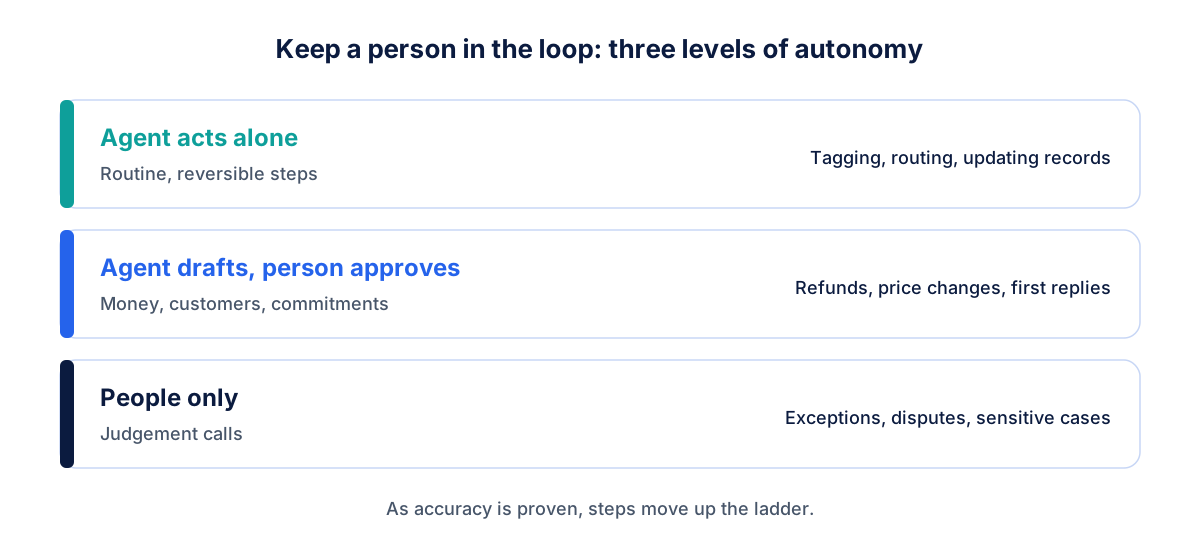
The agents we build act on their own for routine steps and stop for approval where a mistake costs money or trust: refunds, price changes, anything sent to a customer for the first time. Over time, as accuracy is proven, the approval steps can shrink.
Three levels work well in practice:
Agent acts alone on routine, reversible steps, such as tagging, routing and updating records.
Agent drafts, a person approves anything involving money, customers or commitments.
People only for judgement calls, exceptions and sensitive cases.
Log every action the agent takes, so you can see exactly what it did and why.
Measure before you expand
Before go-live, record how long the task takes today, how often it goes wrong and how big the backlog gets. After a month, compare. If the numbers are good, pick the next workflow. If not, you've learned something cheaply.
Good metrics to track:
time from request received to first action
hours of manual work per week
error or rework rate
share of cases handled without a person
customer or team satisfaction
A 30-day rollout plan
Week 1: Pick one workflow using the readiness test. Document the steps and collect real examples.
Week 2: Build the agent with approval steps on, connected to your tools in a test setup.
Week 3: Run it alongside your team. A person checks every output and notes corrections.
Week 4: Go live with approvals where needed, then compare the numbers with your baseline.
How we help
We design and build AI agents that work inside the tools you already use, including email, WhatsApp, CRM and accounting, with approval steps and logs built in. See AI agents and workflow automation, or explore back-office automation.
FAQ
What is the difference between an AI agent and a chatbot? A chatbot answers questions in a conversation. An AI agent completes tasks across your systems, such as reading a document, updating records and sending updates, and hands off to a person when unsure.
Will AI agents replace our staff? In practice, they take over repetitive steps so your team can spend more time on customers, exceptions and decisions. Most businesses redeploy time rather than reduce headcount.
Is it safe to let an AI agent act in our systems? Yes, when it's designed with limited permissions, approval steps for sensitive actions and full activity logs. Start with low-risk, reversible tasks.
How much does it cost to build an AI agent? It depends on the workflow and the systems involved. A focused first workflow is usually a small project; the cost of the running AI model is typically low compared with the hours saved.